Factsheet Quizzes
What are Brightspace Quizzes?
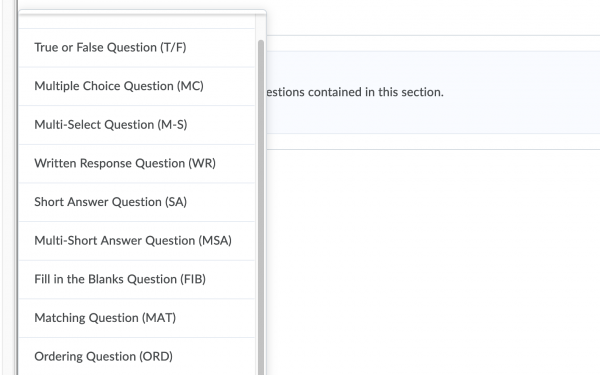
In Brightspace you can design quizzes with a many different types of questions. These include: True or False, Multiple Choice, Written response, Fill in the Blank, Ordering, and Arithmetic questions. Most of these questions will be automatically checked by Brightspace and they can be linked to Grades. You can add feedback to every question and the order of the questions can be randomized per selection. Additionally, you can set a time limit for the students when taking the quiz.
There are different settings in Brightspace Quizzes to adjust your quiz to perfectly fit your course. The setting ‘conditional release’ can be used to demand certain actions before the next item is released. For example, only after the first attempt at test 1, the next test will be available for students. The conditional release can also be used to automatically set awards, for example: ‘when a students gets 80% of the quiz correct, they will automatically get an award for this quiz’. Additionally, you can set a start date and an end date for the quiz. Students can make the quizzes in the browser and via the Brightspace Pulse app.
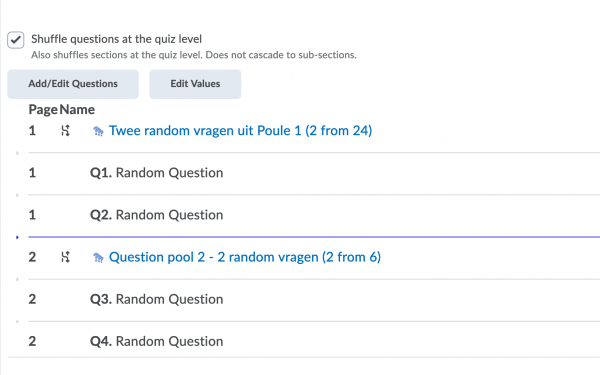
The lecturers that used the Examinations Office for their multiple-choice exams in previous years can contact Hilje Visser. Together you can import the old exam questions to the Question Library. If you want, Brightspace can randomly retrieve questions from the library and add them to the quizzes. This can save a lot of work!
Why Quizzes?
Students can use quizzes to practice the course materials. If the quizzes are linked to the materials of specific lectures or seminars, students are more likely to actively prepare for those lectures and seminars. Additionally, if you can assess the students’ knowledge of the course material during the course, there is more room for application questions in the final exam.
Furthermore, quizzes can be used for formative testing. The feedback on the questions can help the students determine which subjects need more attention while studying for the exam. It helps to add reading suggestions or a link to possible knowledge clips about the subject to the feedback.
Lastly, quizzes can be used as practice tests for students to prepare for the exam. When you add a large collection of questions to the Question Library, you can have Brightspace randomly select one or several questions from the library. As a result, students are able to do the quiz multiple times without getting the same questions over and over again. This will help them determine their knowledge of the course material.
Experience with quizzes
A great example of a successful experience with Brightspace Quizzes is the story of Maartje and Gabriele, who have used quizzes to make the materials more manageable for students. Other lecturers are working with Brightspace Quizzes as well. For example, the Faculty of Law uses Brightspace Quizzes to take exams. The course General Intro to Psychology uses quizzes to create more structure for first year students.
- Labels: case_studies